Voya Mobile App
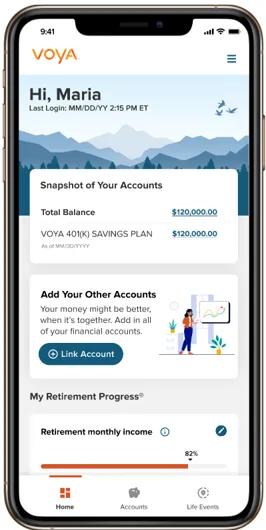
With the Voya mobile app, your finances feel right at home. Get started to experience the benefits today.
- All-in-one access
View and manage your retirement, health savings and investment accounts in one place — alongside external accounts like checking, savings and credit cards — for a complete picture of your financial life. - Personalized financial guidance
Get tailored insights, goal tracking and nudges to help you save more, pay off debt, plan for college or prepare for retirement. - Interactive tools and resources
Model retirement income* with myOrangeMoney®, access video education, live chat support and investment advice all designed to help you take confident action. - Secure and private
Your data is protected with enhanced encryption, multi-factor authentication, biometric voice ID and our S.A.F.E. guarantee. We never sell your personal information — ever. - Streamlined experience
Clean design and intuitive navigation make it easy to check balances, update contributions and beneficiaries, and manage your investments all while on the go. Plus, the entire app is also available in Spanish. - Benefits and health care insights
If offered through your retirement or employee benefits plan, review your workplace benefits and savings options with personalized support,** while also staying on top of your health care by tracking out-of-pocket expenses and receiving reminders for preventive care.
Our mobile app is also available in Spanish to help you manage your account. Download app today.
Wherever life takes you, Voya goes with you.

Log in today to experience your upgraded financial journey — personalized, secure and built to help you retire with confidence. Scan the QR code to download the Voya mobile app today or visit your app store.


Learn more about how the app can help you keep your retirement savings on track
Account details
Here are the key account details you’ll be able to see for each of your plans:
- Quarterly statements
- Current balances and balance history
- Balances by fund and source
- Personal rates of return
- Contribution history
Account management
To help you manage your account, the application may also allow you to conduct the following transactions (if available):
- Make a fund transfer
- Reallocate your current balance
- Change your future investment direction
- Change your contribution amount
- Update beneficiaries
Additional resources to explore
Please see the full S.A.F.E. Guarantee at go.voya.com/datasecurity for more information.
iPhone is a trademark of Apple Inc., registered in the U.S. and other countries. Android is a trademark of Google LLC.
1 Pyramid of Communications Excellence: In February 2026, Voya's Mobile Website was recognized by DALBAR with a 2025 Pyramid of Communications Excellence, including a first-place ranking for Retirement Provider Mobile Sites and a website designation of “Excellent.” The recognition is based on 2025 activity and no fees were paid for consideration. The ranking was based on DALBAR’s in-depth review of 26 mobile websites offered by financial services firms in 11 categories: Design, Security, Mobile Optimization, Ease of Use, Personalization & Customization, Support, Interaction with the Firm, Interactivity, Navigation, Core Content, Behavior Centric. Awards and/or rankings are not representative of actual client experiences or outcomes, and are not indicative of any future performance.
* IMPORTANT: The illustrations or other information generated by the calculators are hypothetical in nature, do not reflect actual investment results, and are not guarantees of future results. This information does not serve, either directly or indirectly, as legal, financial or tax advice and you should always consult a qualified professional legal, financial and/or tax advisor when making decisions related to your individual tax situation.
**Voya Financial and its affiliated companies (collectively, “Voya”) are making available to you the Personalized Enrollment Guidance tool offered by SAVVI Financial LLC. (“SAVVI”). Voya has a financial ownership interest in SAVVI, including representation on SAVVI’s board of directors, and also maintains business relationships with SAVVI that create an incentive for Voya to promote SAVVI’s products and services and for SAVVI to promote Voya’s products and services. Please access and read SAVVI’s Firm Brochure which is available at this link: https://www.savvifi.com/legal/form-adv. It contains general information about SAVVI’s business, including conflicts of interest.
Products and services offered through the Voya® family of companies.